 The Average Learner

The Problem
I was trying to run my express script in VSCode on Windows 11 using the Terminal, and I got back the following PowerShell error:
1cannot be loaded because running scripts is disabled on this system.For more information, see2about_Execution_Policies at https: /go.microsoft.com/fwlink /? LinkID = 135170.3At line: 1 char: 14 + nodemon server5 + ~~~~~~~6 + CategoryInfo : SecurityError: (:)[], PSSecurityException7 + FullyQualifiedErrorId : UnauthorizedAccessThe link didn’t work for me.
Luckily, there is an easy fix.
The Solution
Go to Settings > System > For developers.
Look for PowerShell, then turn this option on:
Change execution policy. -> On
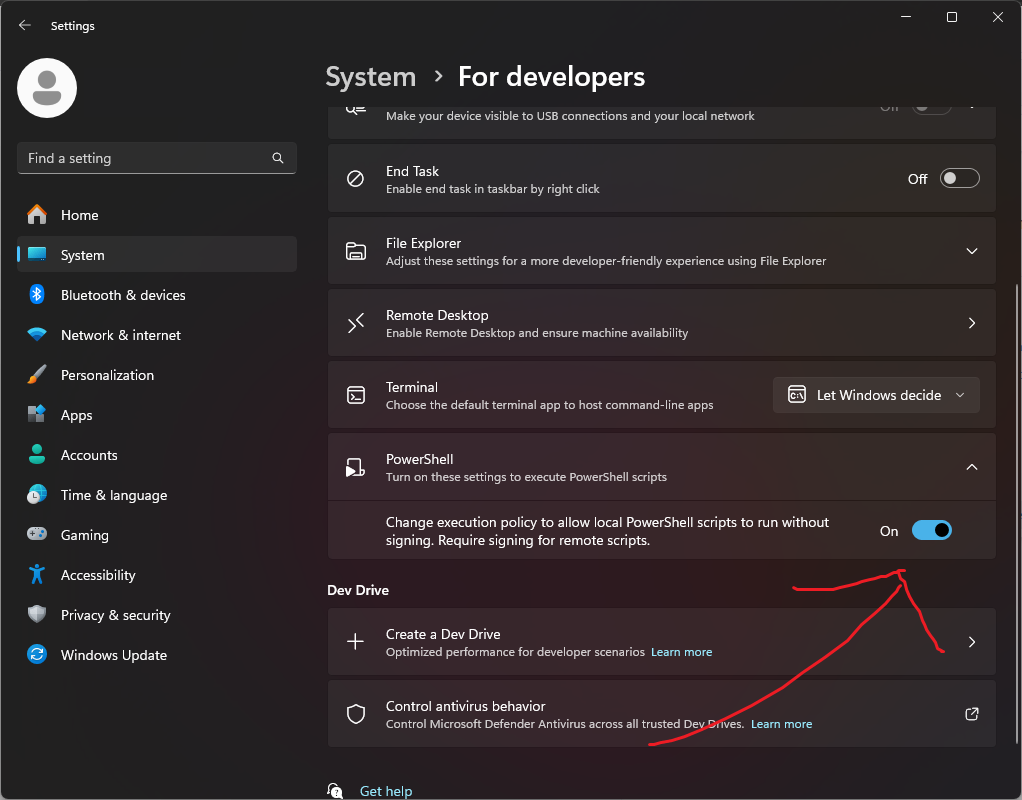
Now run your script again, it should be working. You might get asked for permission to run it for the first time.